
About Wufoo
Wufoo allows you to create on line forms. Unfortunately, there is no integration between Wufoo and Zendesk, but you can use the mail API to send forms to Zendesk that will create a new ticket.
If you are using an internal help desk, the person raising the form may need approval from another user. While there is no approval mechanism in Wufoo, you can workaround this by setting a ticket status to PENDING when it needs authorisation.
Sample Form
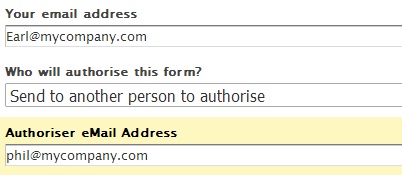
Here is a sample form for a new user. The authorisation section of the form includes a drop down field confirming the user that should authorise the form.

When another user is to authorise the form, an additional authoriser email address field is displayed.
Field settings
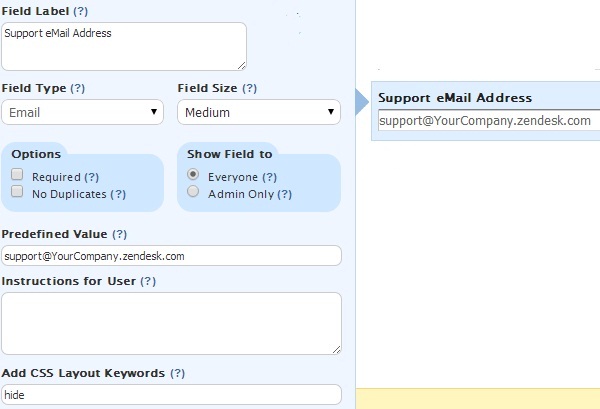
The authoriser fields in the form are standard Wufoo fields. We need fields to hold:
- The Zendesk support email address.
Enter your address as a predefined value and add the 'hide' CSS keyword.
- A field to switch the Zendesk ticket status to pending.
Enter the predefined value 'pending' and the 'cloak' CSS keyword.

Field rules
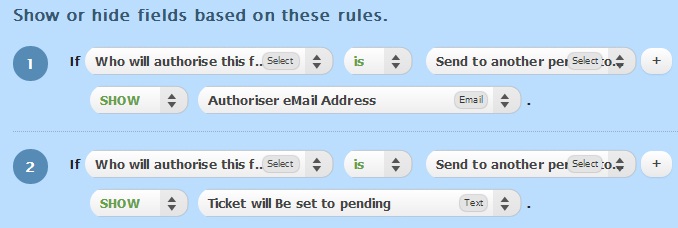
Use Wufoo field rules to show the authoriser email address and the switch pending field when the form is to be sent to another person to authorise.
Confirmation email
The Wufoo confirmation email will be sent to Zendesk to create the support ticket.
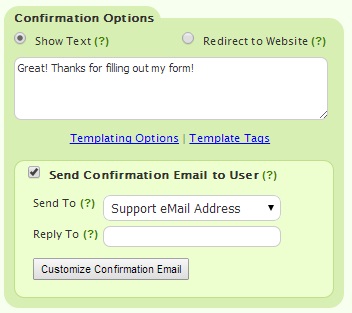
From the form's field settings, ensure you check the 'Send Confirmation Email to User' option and select the support email address field.
Open the template tags link and locate the API ID of email authorisation emails and the switch to pending field.

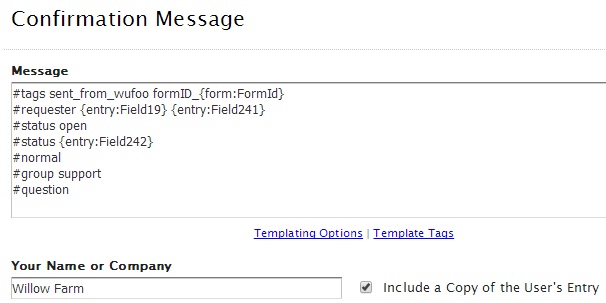
Click the 'customise confirmation email' button to add the Zendesk Mail API commands to the start of the confirmation message.
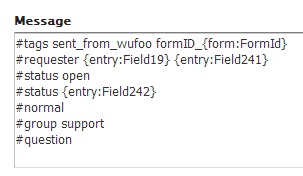
The requester will be set to the authoriser held in Field19 unless a value is not provided when it will be set to the person completing the form held in Field241.
Similarly, the status will be set to OPEN unless we have a value visible in Field242. Because the pending field comes last in the API instructions, this status wins.
Ensure you tick 'include a copy of user's entry' within the confirmation message box to send the full form to Zendesk.
Refining the form
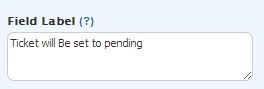
The field labelled 'Ticket will be set to pending' that holds the predetermined 'pending' value will have the label value appear on the form. The label just helps you identify the field. Once you have your rules set up, you can remove the field label to show a blank value.
 |
 |
End Result
When a form is sent and the user indicates that it can be self authorised:
- A new ticket is created with the form content
- The requester is set to the 'Your email address' field
- Ticket status is set to OPEN for agent processing
When a form is sent to be authorised by someone else:
- A new ticket is created with the form content
- The requester is et to the 'Authoriser email address'
- The ticket is set to PENDING for user action.
Zendesk will send a confirmation to the requester of the ticket details using the normal trigger process.
Where a ticket is set to pending from a Wufoo form, you may want to create a custom trigger to emphasise to the requester that action is required. Any update to the ticket by the requester, for example, responding 'approved' will update the ticket status to OPEN.
Agents need to take care when the authoriser responds to the ticket and declines the request.
Limitations
While the person authorising the ticket will receive a ticket from Zendesk, unfortunately, the person completing the form does not. It is not possible to automatically CC or generate a confirmation to that user. The agent would have to manually add the additional user to the ticket if they are to be kept up-to date on the ticket progress.
Comments
0 comments
Please sign in to leave a comment.