
SLA Reporting in GoodData
Summary
Our SLA reporting needs are basic, yet recreating and maintaining SLA metrics within GoodData is cumbersome and involves duplicating criteria entered into Zendesk. The more criteria used to evaluate SLAs, the more complex and cumbersome the task becomes in GoodData.
This restricts our ability to monitor SLAs, offer more advanced SLAs and is a barrier to changing SLAs.
Reflecting the ticket’s SLA status in GoodData would simplify reporting and reduce the risk of error.
GoodData would have to preserve the SLA status of closed tickets should the Zendesk SLA criteria change.
SLA Parameters
Performance is monitored on the time to solve tickets within business hours based on:
- Priority (system field)
- Problem Type (custom drop down field)
The Problem Type
The custom problem type field is required when the agent solves a ticket. This classifies the nature of the ticket. There are two sets of problem types.
- Standing data requests. These are routine requests by end users to create or update standing data within the finance system. E.g. create or amend a supplier record, or create or amend a cost centre code.
- All other requests.
Standing data requests have a shorter SLA time providing a matrix as follows:
Using GoodData
GoodData is used to review SLA performance and check the accuracy of tickets before they reach a closed status.
For example, the GoodData output is reviewed to ensure that:
- The problem type correctly classifies the nature of the ticket. Commonly, tickets fail the SLA target because they have been incorrectly classified as a standing data request.
- The ticket priority is appropriate. Commonly, the end user may classify the ticket as ‘Urgent’, but the priority should be lowered to be more in line with corporate agreements.
Zendesk SLAs do not allow for custom ticket fields, presenting the need to recreate the conditions in GoodData.
GoodData Reports
Dashboards for Standing Data and Non Standing Data requests show a headline report and a list of fails by Organisation.
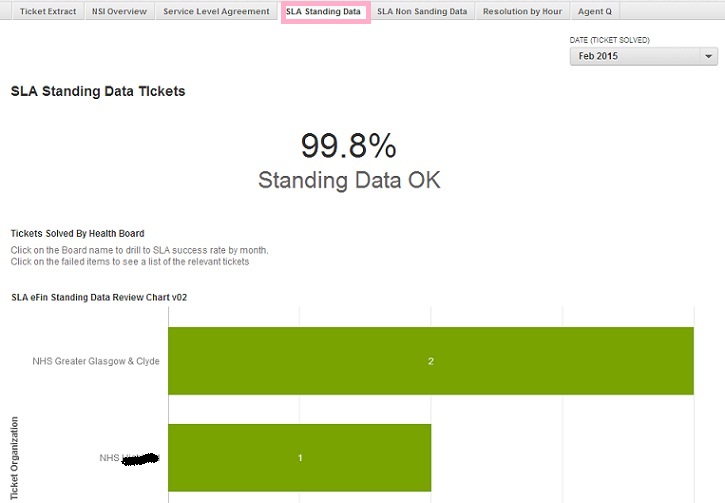
Drilldown to see the failed tickets for each organisation:

Custom Metrics
To create the SLA in GoodData, create a custom metric to flag if an item relates to a standing data problem type:

Use this metric when evaluating each ticket priority:

Unfortunately, you can end up with many custom metrics to handle each priority.
 |
 |
Maintenance
Even with limited SLA requirements, the number of metrics to create and maintain in GoodData is cumbersome. Additional criteria would make reporting more challenging, for example:
- Ticket organisation
- Ticket type
- Time to assign
- Non business hours
There is also the risk that GoodData and Zendesk can become out of sync if the SLA criteria changes as the SLA terms have to be entered in both systems separately.
In addition, changing SLA conditions would be retrospective in GoodData unless more complex metrics also include an SLA effective date.
Comments
0 comments
Please sign in to leave a comment.